IP Addresses
IPV4 → 32bits (four octets) IPV6 → 128bits
IP can be:
- unicast (one to one)
- broadcast (every host of a network)
- multicast (group of ip addresses in a network)
IP Command
ip link show- Show interfaces
ip link set eth0 (up|down)- Bringing interface up/down
ip link set eth0 address 00:11:22:33:44:55- Set MAC address
ip address show [dev eth0]- Show IP address
ip address (add|del) 10.0.0.1/8 dev eth0- Add/remove IP address
ip address flush [dev eth0]- Flush any IP address (remove the assigned addresses)
Ip for routing purposes
ip route (list|flush)- List/flush routing table
Add/del routes
ip route (add|del) 10.0.0.0/8 via 10.0.0.1- next hop
ip route (add|del) default via 10.0.0.1- default
ip route (add|del) 10.0.0.0/24 dev eth0- direct forwarding
IP for ARP
ip neigh show [dev eth0]- Show ARP cache
ip neigh flush dev eth0- Flush ARP cache
ip neigh (add|del|change|replace) to 10.0.0.2 lladdr 00:11:22:33:44:55 dev eth0 nud “state_name”- Add/del/change/replace ARP cache entry
–
ip tunnel - IP tunneling (IPinIP, IPinGRE, IPv6 tunneling)
- Add/del/change/replace ARP cache entry
–
ARP
ARP ⇒ Address Resolution Protocol
Proxy ARP
Proxy ARP is a technique by which a proxy device on a given network answers the ARP request for an IP address that is not on that network. The proxy is aware of the location of the traffic’s destination and offers its own MAC address as the destination.
Gratuitous ARP
Gratuitous ARP is almost like an administrative procedure, carried out as a way for a host on a network to simply announce or update its IP-to-MAC address. Gratuitous ARP is not prompted by an ARP request to translate an IP address to a MAC address.
Reverse ARP (RARP)
Host machines that do not know their own IP address can use the Reverse Address Resolution Protocol (RARP) for discovery.
Inverse ARP (IARP)
Whereas ARP uses an IP address to find a MAC address, IARP uses a MAC address to find an IP address.
Attacks
- MITM
- DoS
- Session Hijacking
- ARP Spoofing: ARP cache poisoning or ARP poison routing, is a technique by which an attacker sends (spoofed) ARP messages onto a local area network. This results in the linking of an attacker’s MAC address with the IP address of a legitimate computer or server on the network. Once the attacker’s MAC address is associated with an authentic IP address, the attacker will begin receiving any data that is intended for that IP address.
IP Packet
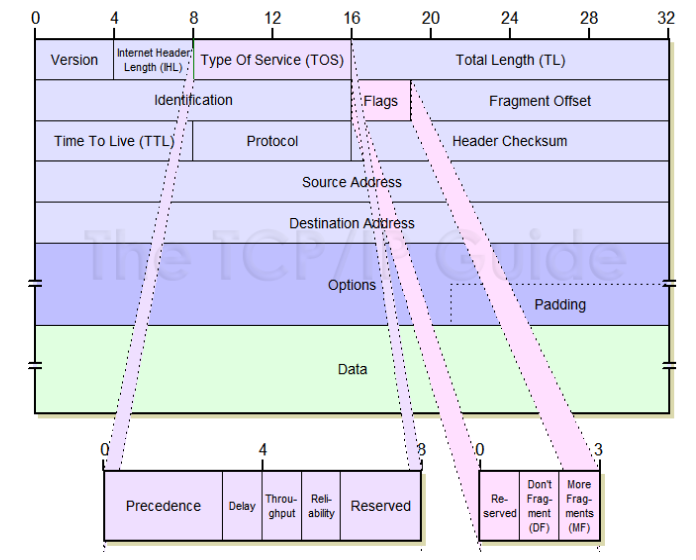
IPV4
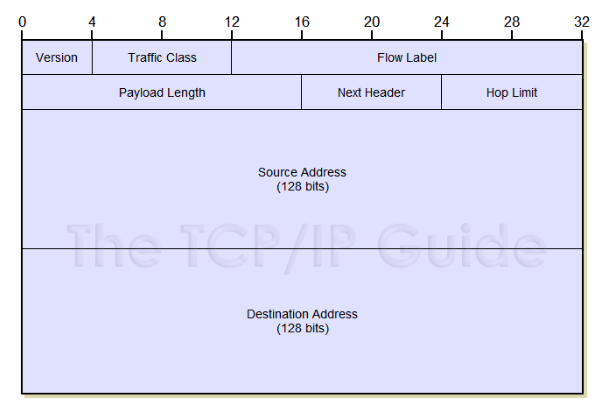
IPV6
Rules for compressing
- First rule: Leading zeroes in any 16-bit segment do not have to be written.
- Only leading 0s can be excluded, trailing 0s must be included.
- Any single, contiguous string of one or more 16-bit segments consisting of
all zeroes can be represented with a double colon (
::).
Sono solo 8 ottetti. Ogni ottetto è 16 bit.
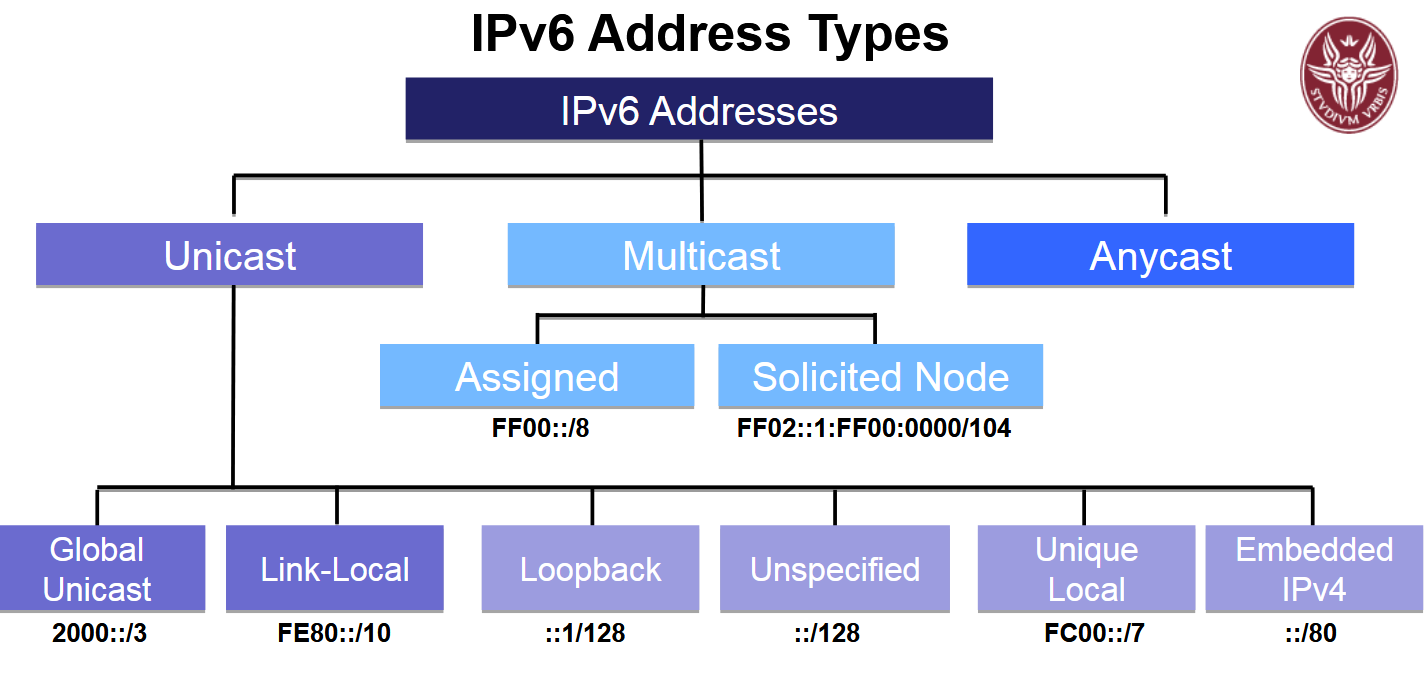
Indirizzi
-
Unicast: Indirizzo per un solo dispositivo. Esempi:
-
Global Unicast: indirizzi validi su Internet, iniziano per
2000::/3. -
Link-Local: valgono solo nella rete locale, iniziano per
fe80::/10. -
Loopback: per test locali del dispositivo,
::1/128 -
Unspecified: indica “nessun indirizzo”,
::/128 -
Unique Local: simili agli indirizzi privati IPv4, iniziano per
fc00::/7 -
Embedded IPv4: usati per compatibilità,
::/80
-
-
Multicast: Un indirizzo che rappresenta un gruppo di dispositivi. Chi invia a questo indirizzo comunica con tutti i membri del gruppo.
-
Assigned: gruppo assegnato,
FF00::/8 -
Solicited Node: usato dal protocollo,
FF02::1:FFxx:xxxx/104
-
-
Anycast: Un indirizzo assegnato a più dispositivi, ma la richiesta viene indirizzata solo a quello “più vicino”.
Sintesi: come riconoscere
-
Se inizia per 2000 → global unicast.
-
Se inizia per fe80 → link-local.
-
Se è ::1 → loopback.
-
Se è :: → unspecified.
-
Se inizia per fc00 → unique local.
-
Se inizia per ff → multicast (FF02::1 – All IPv6 Devices, FF02::2 – All IPv6 Routers)
-
Se vedi :: con cifre di IPv4 → embedded IPv4.
SLAAC
-
SLAAC significa “Stateless Address Auto Configuration”.
-
Permette a un dispositivo di auto-configurarsi da solo, senza bisogno di un server.
-
Il router invia sulla rete delle informazioni (Router Advertisement).
-
Il dispositivo prende il “prefisso” (i primi 64 bit) e si costruisce il suo indirizzo IPv6 aggiungendo qualcosa di suo (di solito basato sul MAC oppure casuale).
-
È “stateless” perché nessuno tiene una lista degli indirizzi usati.
Altri metodi: DHCPv6 (stateful e stateless)
-
DHCPv6 stateful: Qui c’è un server che assegna e ricorda quale dispositivo usa quale indirizzo, come il DHCP classico per IPv4.
-
DHCPv6 stateless: Il server fornisce solo info aggiuntive (come DNS), ma il dispositivo si fa l’indirizzo con SLAAC. Il server quindi non tiene traccia di chi usa quale indirizzo.
TCP Handshake
- S → D: SYN (seq=x)
- D → S: SYN+ACK (seq=y, ack=x+1)
- S → D: ACK (seq=x+1, ack=y+1)
Wireshark
-
Data from a network interface are “dissected” in frames, segments, and packets, understanding where they begin and end
-
Then, they are interpreted and visualized in the context of the recognized protocol
-
Promiscuous mode (also called monitor mode) is required to capture packets not intended for the capturing host
-
Best suited for
- Looking for the root cause of a known problem
- Searching for a certain protocol or stream between devices
- Analyzing specific timing, protocol flags, or bits on the wire
- Following a conversation between two devices
Filters!
-
They allow to only focus on requested packets or certain activity by network devices
-
Two kinds of filters: display filters and capture filters
-
Capture filters to limit the amount of network data that goes into processing and is getting saved
-
Display filters to inspect only the packets you want to analyze once the data has been processed
-
Berkeley Packet Filter (BPF) syntax :
protocol direction type- Protocol:
ether, tcp, udp, ip, ip6, arp - Direction:
src, dst - Type:
host, port, net, portrange - Other primitives:
less, greater, gateway, broadcast - Combinations with operators:
and (&&), or (||), not (!)
- Protocol:
IPv4 vs IPv6 Headers
-
IPv4:
-
“Very Important Things Take Priority For Fast Tracking Packets Safely During Operation”
- (V=Version, I=IHL, T=Type of Service, T=Total Length, P=Identification, F=Flags, F=Fragment Offset, T=TTL, P=Protocol, S=Checksum, S=Source Addr, D=Dest Addr, O=Options)
-
IPv6
-
“Very Tidy Flowers Provide Nice Hope”
- (V=Version, T=Traffic Class, F=Flow Label, P=Payload Length, N=Next Header, H=Hop Limit)
DMZ
La DMZ è come un cortile di sicurezza davanti alla tua casa.
Immagina che la tua casa è la tua rete privata, dove tieni tutte le cose preziose.
Il cortile (la DMZ) è un posto in cui puoi mettere giochi o cose che vuoi mostrare agli amici o a chiunque venga a trovarti, ma senza far entrare direttamente nessuno dentro casa.
Se un ladro dovesse entrare nel cortile, può solo trovare quello che è lì, ma non può arrivare dentro casa tua perché hai un cancello chiuso e ben protetto tra cortile e casa.
Così, metti in DMZ tutte le cose (come il sito web o il server di posta) che devono essere viste o usate da chi è fuori, e tieni la tua rete interna al sicuro lontano dai pericoli.
IPTables
Master: iptables -A INPUT -p tcp --dport 22 -j ACCEPT
NAT
Il NAT (Network Address Translation) è una tecnica usata nei router per tradurre gli indirizzi IP dei dispositivi di una rete privata in un indirizzo IP pubblico quando comunicano su Internet, e viceversa.
Cos’è il NAT
-
Serve per far sì che molti dispositivi in una rete locale (come computer, telefoni) possano condividere un unico indirizzo IP pubblico.
-
Dietro al NAT c’è un router con due interfacce: una verso la rete interna (LAN) con indirizzi privati, e una verso Internet con indirizzo pubblico.
-
Il NAT cambia gli indirizzi IP nei pacchetti: quello privato del dispositivo lo trasforma nel suo indirizzo pubblico quando escono, e fa l’operazione inversa al ritorno.
Come funziona il NAT
-
Quando un dispositivo della rete locale vuole connettersi a Internet, il suo indirizzo privato viene sostituito con l’indirizzo pubblico del router.
-
Quando arriva la risposta, il router usa una tabella per capire a quale dispositivo interno deve mandare quel pacchetto, e sostituisce l’indirizzo pubblico con quello privato originale.
-
Così, per Internet sembra che tutta la rete locale sia un unico dispositivo con quell’indirizzo pubblico.
I vari tipi di NAT
-
Source NAT: SNAT, as the name suggests, is a technique that translates source IP addresses generally when connecting from a private IP address to a public IP address. It maps the source client IP address in a request to a translation defined on a BIG-IP device. It is the most common form of NAT that is used when an internal host needs to initiate a session with an external host or public host.
-
Destination NAT: DNAT, as the name suggests, is a technique that translates the destination IP address generally when connecting from a public IP address to a private IP address. It is generally used to redirect packets destined for a specific IP address or specific port on an IP address, on one host simply to a different address mostly on a different host.
-
PAT (Port Address Translation) o NAT Overload: il tipo più comune, fa condividere lo stesso indirizzo IP pubblico a molti dispositivi usando numeri di porta diversi.
Perché si usa il NAT?
-
Per risparmiare indirizzi pubblici (che scarseggiano).
-
Per sicurezza, perché i dispositivi interni non sono direttamente visibili da Internet.
-
Per gestire meglio la rete privata.
Altri comandi utili
Create a new tun virtual interface (use root user)
ip tunnel add tun0 mode ip ip remote <ipaddressR> local <ipaddressL>
Proxy
Normal (non-transparent) Proxy
-
Il client deve sapere e configurare il proxy (es. nel browser o sistema).
-
Il proxy agisce come intermediario mascherando il client: nasconde l’indirizzo IP reale e può modificare le richieste.
-
Utile per privacy, accesso a contenuti bloccati, anonimato.
-
Il server di destinazione spesso non sa che c’è un proxy.
Transparent Proxy
-
Il client non deve fare nulla né configurare niente: il proxy lavora “dietro le quinte”.
-
Non maschera l’IP del client, quindi il server sa che c’è un proxy e vede l’IP originale.
-
Serve per controllare, filtrare, monitorare il traffico in modo semplice e generale.
-
Utile in aziende, scuole, Wi-Fi pubblici per limitare accessi, registrare attività o autenticare utenti.
Quindi…
-
Normal proxy = tu lo scegli, ti protegge e ti nasconde.
-
Transparent proxy = nemmeno lo sai che c’è, ti controlla e filtra.
IDS
An Intrusion Detection System (IDS) aims at detecting the presence of intruders before serious damage is done.
Second generation IDS are IPS, Intrusion Prevention Systems, also produce responses to suspicious activity, for example, by modifying firewall rules or blocking switches ports
Data Plane Protection
Il Data Plane Protection è un insieme di misure di sicurezza che proteggono la parte del dispositivo di rete (come router o switch) che si occupa di inoltrare i dati (pacchetti) da una porta a un’altra.
-
Il Data Plane è la zona del dispositivo che gestisce i dati veri e propri in transito, cioè decide dove mandare ogni pacchetto.
-
La protezione del Data Plane serve a evitare che attacchi o traffico malevolo blocchino, modifichino o sovraccarichino questa funzione critica.
-
Spesso prevede filtri, regole, limitazioni di traffico (firewall, ACL), e monitoraggio per mantenere la rete efficiente e sicura.
-
Se il Data Plane viene compromesso, il dispositivo smette di instradare correttamente i dati, causando problemi di rete gravi.
Il Data Plane sia protetto garantisce che:
- I dati viaggino correttamente nella rete.
- Nessun attacco interrompa il funzionamento del router o switch.
- I dispositivi di rete rimangano stabili e affidabili.
In sintesi, Data Plane Protection è come mettere una guardia speciale sulla linea di montaggio (il passaggio dati) dentro i dispositivi di rete, per non far entrare sabotatori che fermano o rovinano la produzione (il traffico dati).
Livelli:
- Livello 2: Sicurezza tra dispositivi vicini, si controllano indirizzi fisici (MAC).
- Disable gratuitous ARP packets, Enable dynamic ARP inspection (DAI) mechanism, Disable ARP Proxy IP if not needed, Enable port security mechanism, Enable DHCP snooping mechanism, Enabling the IP source guard mechanism
- Livello 3: Messa in sicurezza del routing, si controllano indirizzi IP e pacchetti. (ACL)
- Livello 4: Protezione delle connessioni, si filtrano dati in base a porte e stato della comunicazione. ICMP (ACL e filtri)